One place where parents find everything
The timetable, the absences, the grades, what is owed and what needs signing — in a portal and an app with your school’s name on it, and a notification the moment something new arrives.
Free forever for up to 5 students · No card required
What a parent portal should actually do
A parent portal is a private area where each family signs in and sees what concerns its own children: the timetable, attendance, grades, fees, documents and messages from teachers. A good one replaces the phone calls to the office and the group chats on personal phones, and shows a family nothing about anyone else’s child.
Schoolly gives every school a family portal, a portal for teachers and staff, and a mobile app for Android and iOS with the same sign-in. What families see is your decision, message rules are fixed so nothing is left open by mistake, and the free plan lets you try it with real families for as long as you like.
What families and teachers get
Each person signs in to their own area and finds what concerns them, and nothing more.
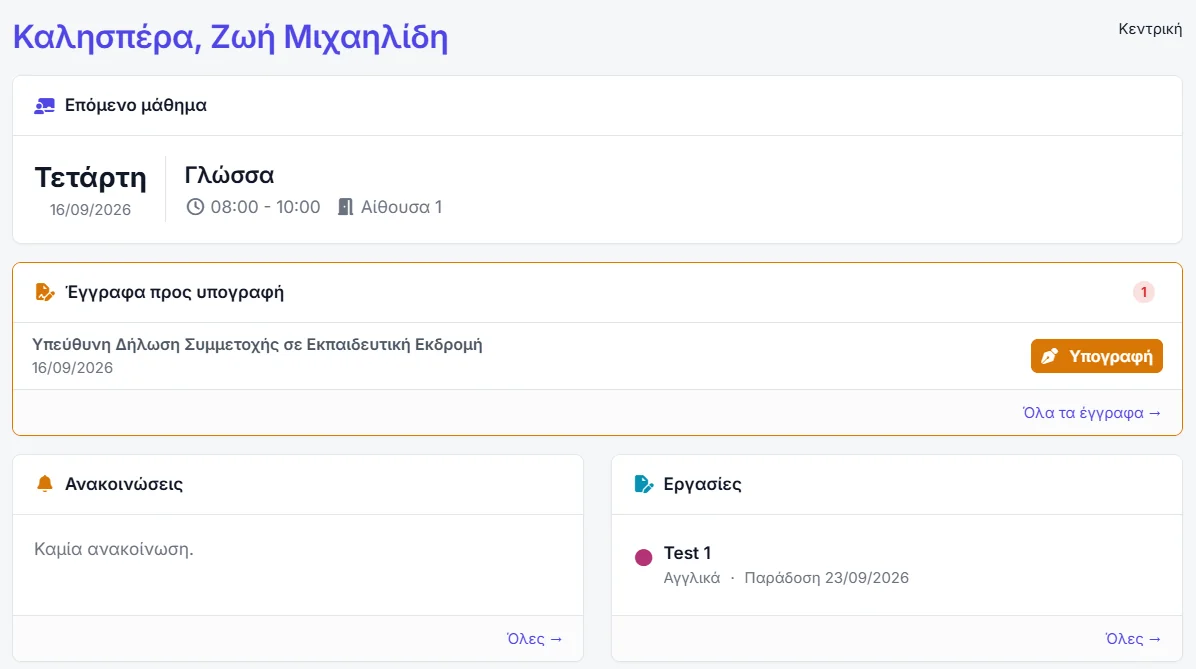
A family dashboard
The next lesson, documents waiting for a signature, the latest announcements and attendance, on the first screen.
Several children, one account
A parent with three children switches between them at the top of the page instead of signing in three times.
You decide what shows
Payments, assignments and grades can each be shown or hidden, separately for parents and for students.
Messages without phone numbers
Parents write to their child’s teachers inside the system, so nobody has to hand out a personal number.
A portal for teachers
The day’s lessons with a register button, their own gradebook and their own students — and nothing beyond.
An app that notifies
On Android and iOS, with a notification for messages, grades and announcements instead of an email nobody opens.
The family portal
A separate area with its own sign-in, branded with your school. A family sees only its own children, and that is not a setting anyone can switch off.
- Calendar, subjects and attendance — the child’s full programme, subject by subject.
- Grades and assignments — shown or hidden as you decide, with the material attached to each assignment.
- Documents to read and sign — with a count of how many still wait for a signature.
- Fees and payment — balance, history, receipts to download and online payment into the school’s own account.
- Notes, files and announcements — whatever has been shared with that child, and nothing else.
- The bus and the stop — where the school uses the transport add-on.
The teacher and staff portal
Built to work on a phone, because that is where a register gets taken.
- The teacher’s day — today’s lessons with a register button, announcements, birthdays and a to-do list.
- Their own gradebook — the same grid as the office, restricted to the subjects they teach.
- Their own students — and those students’ contacts, with no access to other classes.
- Scoped communication — email, SMS and announcements to their own students and families — and no further.
- Their own profile — photo, password, calendar connection and leave requests.
The mobile app
Everything in the portal, in an app for parents, students and teachers.
- Android and iOS — from Google Play and the App Store.
- The same sign-in — as the web portal, so there is nothing new to set up.
- Notifications — for messages, grades and announcements, the moment they happen.
- At a glance — attendance, the timetable, the calendar, fees and receipts.
Common questions
Open the portal to one real family
The free plan is permanent and takes five students — enough to see the portal and the app the way your parents will.
No card required · Free forever for up to 5 students