Every child on the right bus, and every parent knowing where it is
Routes, buses and stops, a driver’s screen that records who got on and off, and — where you allow it — the bus’s live position for the parent waiting at the stop.
Free forever for up to 5 students · No card required
What school bus management software should do
School bus management software keeps the routes, the stops and the list of children on each trip, records on the bus who boarded and who got off, and tells parents where the bus is while it is on its way. It has to build the afternoon runs from when each child actually finishes, and bill transport to the families who use it.
In Schoolly this is the transport add-on, bought on top of a paid plan; until then it stays in the menu with a padlock, so you can see what it does first. The driver logs each child on and off from a phone, and parents see the live position of the bus during a run — only if the school allows it, and only for their own child’s bus.
What the add-on covers
From the office’s map of routes to the parent at the stop.
Routes and timed trips
An ordered list of stops and a roster of students for every trip, morning and afternoon.
A suggested stop order
With estimated minutes per stop, as a starting point for whoever knows the roads.
Points per child
A child can be picked up at one place and dropped off at another.
Dismissal times
Worked out from each child’s own timetable, so the afternoon runs are built correctly.
The driver’s screen
Start the run, log each child on and off, end the run — built for a phone.
Live position for parents
While a run is under way, if the school allows it, scoped so no family ever sees another child.
Planning the routes
The office sets the fleet and the stops once, and the trips are built from them.
- Buses and stops — the fleet, and the map of pick-up points.
- Trips with times — each with its ordered stops and its own list of students.
- Estimated minutes per stop — with a suggested order you can change.
- Different morning and afternoon points — set per child.
- Afternoon runs from the timetable — each child’s dismissal time comes from their own lessons.
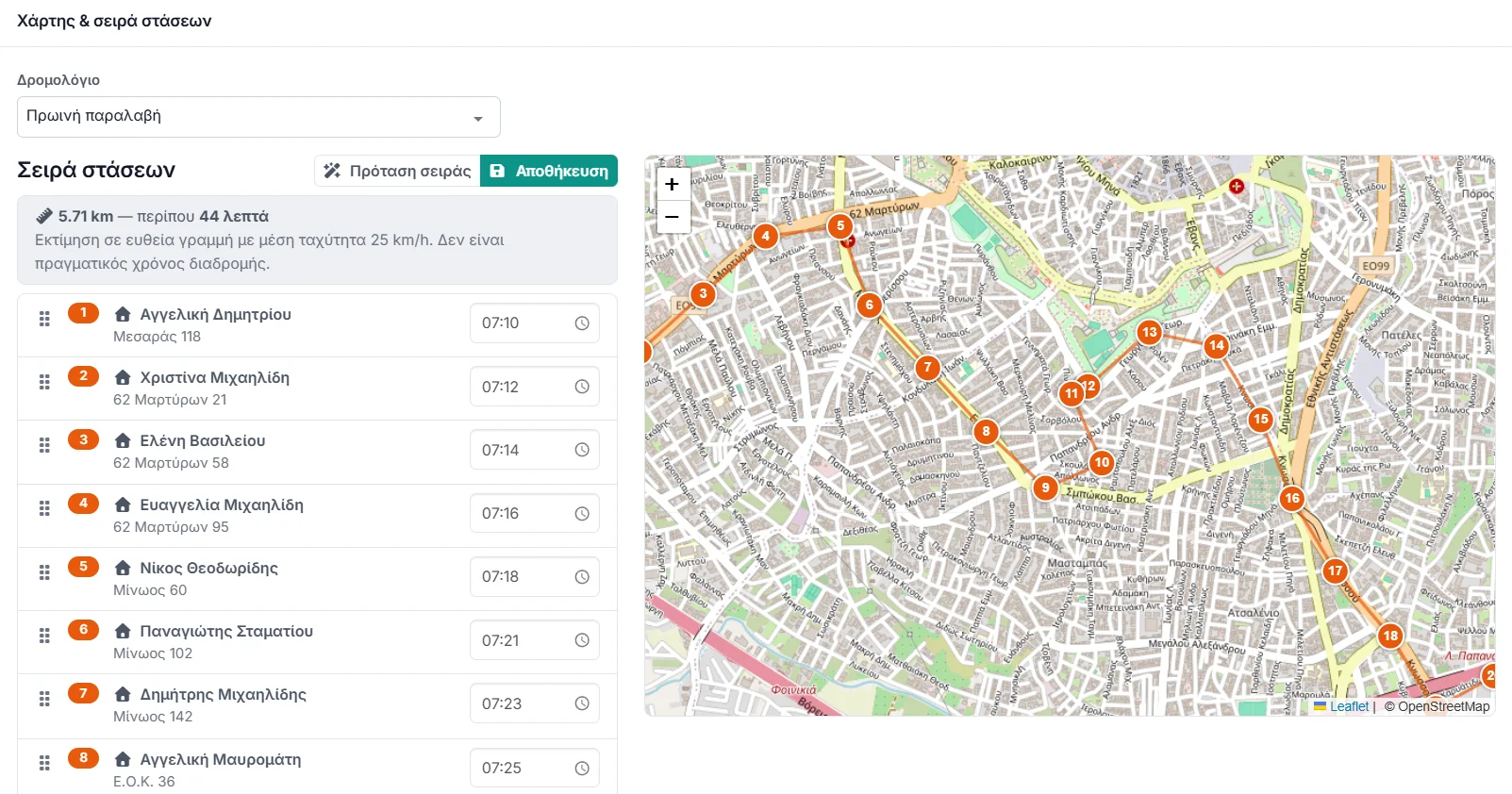
On the bus and at the stop
What happens during the run, for the driver and for the families.
- A boarding log — who got on and who got off, kept on the driver’s phone.
- The bus on a map — its live position for parents while the run is under way.
- Only their own child — a family sees the bus its child is on, and nothing about anyone else.
- Your decision — the live position is shown only if the school switches it on.
- In the family portal — the bus, the stop and the times, alongside everything else.
Billing and cost
Transport is charged to families like any other fee, and the add-on is charged to the school separately.
- Transport billing — the fee for everyone on a route, in one action.
- On top of a paid plan — the add-on is not part of the free plan.
- Charged for the days left — bought mid-cycle, it is charged only for what remains of that cycle.
- Visible before you buy — the menu shows it with a padlock until it is bought.
Common questions
Start with the school, add the buses after
Set up the free plan first; the transport add-on goes on top of a paid plan whenever you are ready, and you can see the menu for it from day one.
No card required · Free forever for up to 5 students