A private school, run from one system
Admissions, the timetable, the gradebook, fees and the school bus — with a portal for every parent, student and teacher, and each colleague seeing only what you allow.
Free forever for up to 5 students · No card required
What private school software has to do
Software for a private school — primary, lower or upper secondary — has to hold every student’s record, timetable, attendance and grades for each school year, and give parents, students and teachers their own view of it. It also has to handle what a state school does not: admissions from first enquiry to enrolment, tuition fees and their receipts, and often the school bus.
Because many people work in a private school’s office, it must also let the school decide exactly who sees and changes what. Schoolly covers all of this in Greek and English: portals and a mobile app for families and teachers, a gradebook on your own scales, transport as a paid add-on with the bus’s live position, and permissions per colleague, module by module.
What a private school gets
The school as a whole, with the right part of it in front of each person.
A portal for everyone
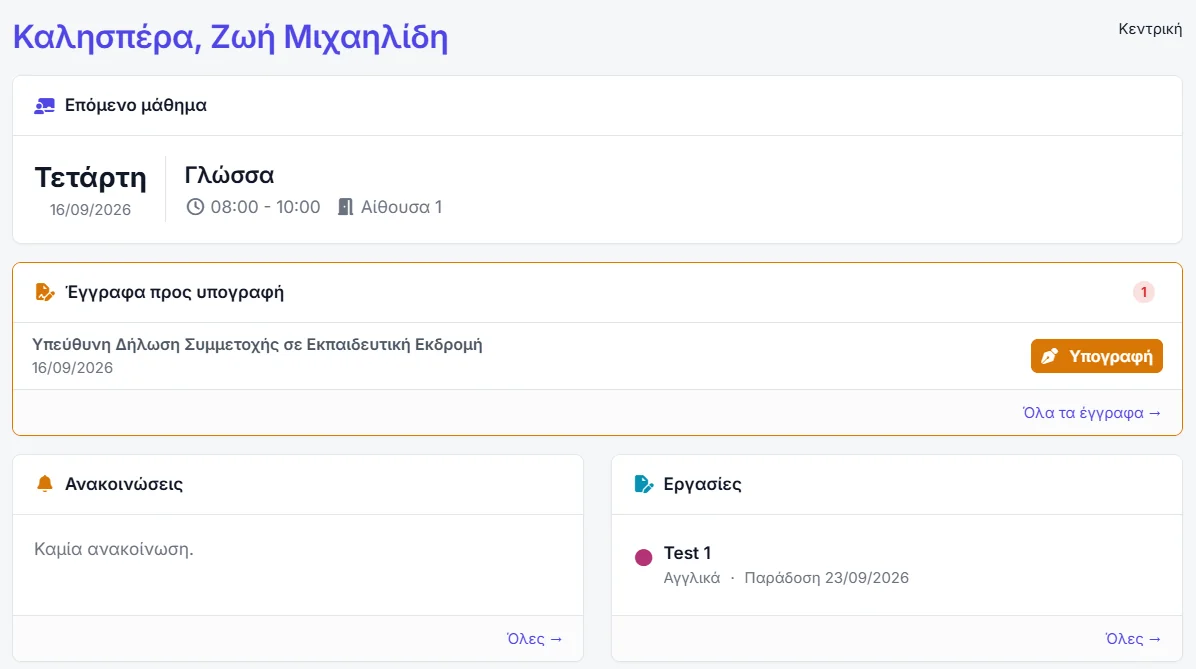
Parents, students, teachers and staff each sign in to their own area, branded with your school, and see only what concerns them.
The gradebook
Your own assessment types and scales per subject, filled in by teachers for their own subjects and published when you decide.
The timetable
Sections tie a subject to a teacher, a room and weekly hours, with no teacher or room booked twice.
School transport
A paid add-on: routes, stops, the driver’s boarding log and the bus’s live position for the parent at the stop.
Admissions
Prospective families from first enquiry to enrolment, with a public enquiry form you can share.
Permissions per colleague
Each person in the office gets exactly the access you grant, module by module, starting from nothing.
Teaching, grades and the school year
Everything belongs to a teaching period, so this year and last year never mix.
- Classes and progressions — year groups for a school, each with a route to the next.
- The lesson register — attendance, behaviour, grades, whether the lesson was held, and notes.
- Assignments — for a whole section or named students, with the material attached.
- The teacher’s own gradebook — the same grid as the office, restricted to their subjects, exportable to PDF and Excel.
- Year rollover — a guided move of classes, subjects, sections, people and portals into the new year.
Admissions, families and transport
From the first phone call about next September to the bus that brings the child home.
- Prospects to students — every enquiry followed from the first contact through to enrolment.
- Contacts linked to children — a parent of three appears once and switches between the children in the portal.
- Forms signed online — enrolment documents and consents issued per student and signed in the browser.
- Routes and stops — per-child pick-up and drop-off points, and dismissal times worked out from each timetable.
- Live bus position — for parents while a run is under way, where the school allows it.
The office, under control
The administrative side of a school with several people in its office.
- Per-user permissions — from reading a list to deleting a record, set for each module.
- Record history — who changed what, when, and from what to what.
- Reports — attendance, grades, balances, teachers and bus routes, exported to Excel, CSV or PDF.
- Fees and myDATA — instalments, online payment into your own account and receipts transmitted to ΑΑΔΕ.
- The recycle bin — anything deleted can be restored.
Common questions
Set up one class before you decide
Five students, free and permanent: enough to build a timetable, open the parent portal and send a real document to a real family.
No card required · Free forever for up to 5 students